
AUTOTUNER
Tool Deep Dive
What the Autotuner Tool actually does
A complete breakdown of the tool's capabilities — how it connects to vehicles, what you can read and write, and what makes it different from every other ECU tool on the market.
Capabilities
Six things the Autotuner Tool can do
Most tuning tools do one or two things well. Autotuner handles the full workflow — from the first read to the final write — without needing separate hardware.
Read ECU & TCU files
Pull the original factory file from the engine or transmission controller. This gives you a clean backup and the starting point for any tune.
Write tuned files back
Flash your modified or purchased tune file back to the ECU/TCU. The tool handles the full write cycle safely with checksum verification.
Unlock protected controllers
Many modern ECUs ship with read protection enabled. Autotuner supports unlocking a wide range of controllers, including mail-in unlocks from Viezu USA.
Live data & diagnostics
View real-time sensor data, fault codes, and live parameters from the ECU. Useful for pre-tune diagnosis and post-tune verification.
ECU & TCU programming
Full read/write support for engine and transmission control units across thousands of vehicles — petrol, diesel, hybrid, and more.
Stage 1, 2 & custom tuning
Use the tool with Viezu's file service to deliver Stage 1, Stage 2, economy, or fully custom tunes. The tool doesn't limit your tune type.
Connection Methods
OBD, Bench & Boot — explained
The Autotuner Tool supports all three access methods. Most jobs are done via OBD. Bench and Boot exist for vehicles where OBD access isn't enough.
01
OBD (On-Board Diagnostics)
Most commonConnect through the vehicle's standard diagnostic port. No disassembly required.
How it works
- Plug directly into the OBD-II port under the dashboard.
- Fastest method — most reads and writes complete in minutes.
- Works on the majority of modern vehicles (2005+) without opening the bonnet.
- Ideal for Stage 1 tuning, ECU reads, and fault code diagnostics.
- Some newer or protected ECUs require bench or boot instead.
Best for
Most cars and light trucks with accessible OBD port and no ECU read protection.
02
Bench Mode
For deeper accessRemove the ECU from the vehicle and connect directly to the circuit board.
How it works
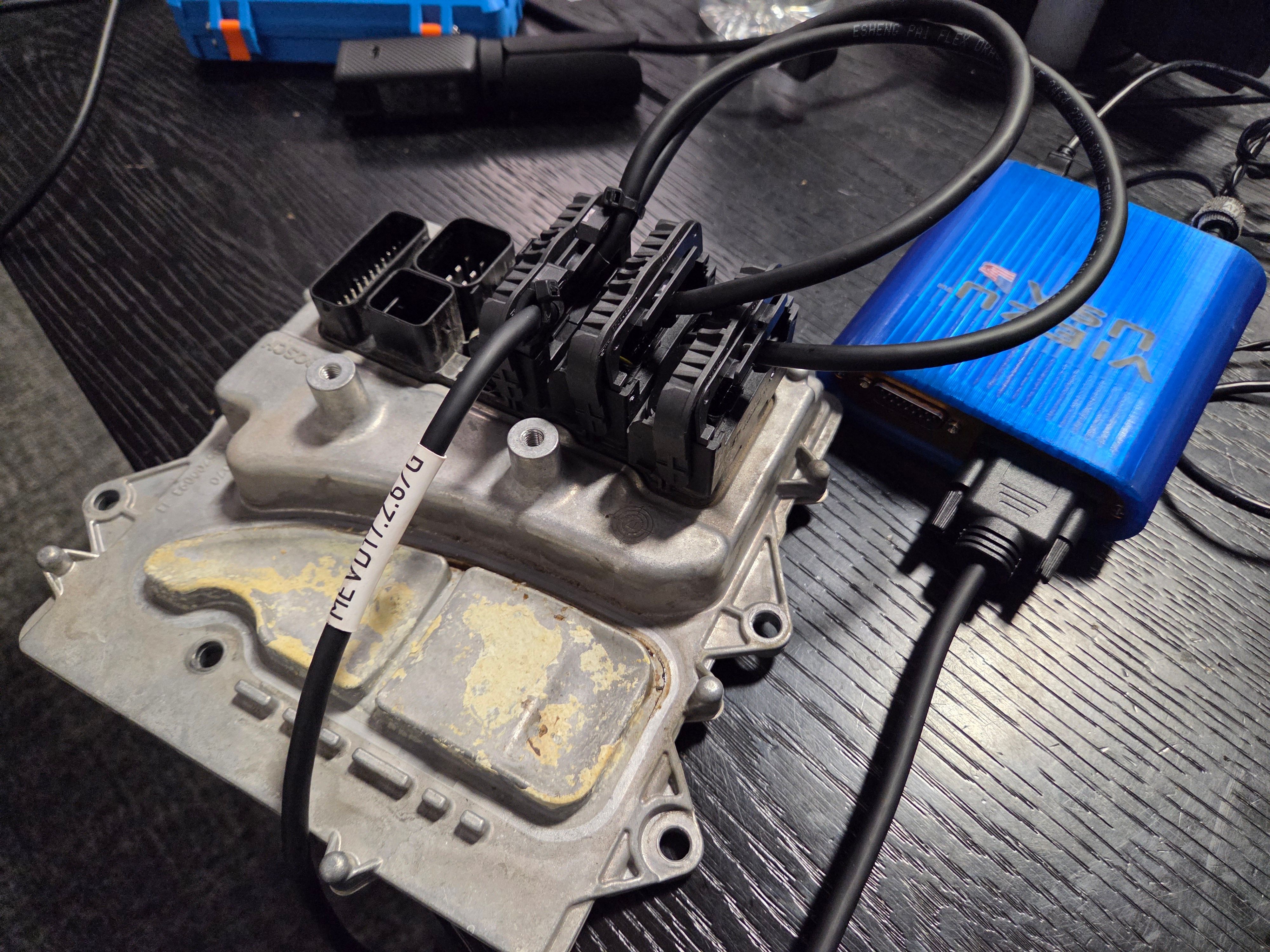
- ECU is removed from the car and placed on a bench.
- Connects via a direct wiring harness to the ECU's power and data pins.
- Bypasses OBD-level restrictions — access to locked or protected ECUs.
- Slower than OBD but more reliable on stubborn or damaged controllers.
- Required for many diesel ECUs, commercial vehicles, and European models.
Best for
Protected ECUs, high-security controllers, commercial and agricultural vehicles.
03
Boot Mode
Deepest accessAccess the ECU at chip level using physical contact points on the PCB.
How it works
- Involves direct access to the ECU's JTAG, BDM, or BOOT pins.
- Enables reading and writing on the most heavily protected ECUs.
- Required for unlocking certain BMW, Mercedes, VAG, and other locked units.
- More technical than OBD or bench — Viezu USA provides guidance on setup.
- Once unlocked, subsequent reads/writes often drop back to OBD or bench.
Best for
Locked or crypto-protected ECUs that cannot be read any other way.
Versions
Master vs Slave — which do you need?
Both versions use the same hardware. The difference is in what each tool is authorized to do. For most shops buying their first Autotuner, Master is the answer.
Master
Full control. Full workflow.
The Master tool is the full-capability version. You can read and write ECU/TCU files, unlock controllers, and flash any tune file you have — whether you wrote it yourself or purchased it from a file service like Viezu.
Masters also act as the parent account for Slave tools. If you run a shop and want technicians or remote customers to flash your tunes, you give them a Slave linked to your Master.
Best for: shops doing their own tunes or who have a dealer network and independent tuners.
Slave
Flash-only. Linked to a Master.
A Slave tool can only flash tune files that come from its linked Master. It cannot read ECUs independently or access the full Autotuner software suite.
Slaves are ideal for dealers who buy tunes from a Master-holding tuner, or for shops that want a second station for flashing. You specify the Master tool ID at checkout.
Best for: Shops, dealers, resellers, satellite workshops, second-station flashing.
FeatureMasterSlave
Flash your own tune files
Flash files from File Service
Read ECU files
Write ECU files
Unlock ECUs
Live diagnostics & data
Access all software features
Requires a linked Master
Lower purchase price
Not sure which to order?
If you're buying your first Autotuner and you're not sure which you need, reach out for more information. When in doubt, ask us before ordering.
Workflow
A typical tuning job, start to finish
From connecting the tool to handing the keys back to the customer — here's how a complete ECU remap looks using the Autotuner Tool and Viezu's file service.
01
Connect the tool to the vehicle
Plug the Autotuner into the OBD port, wire it up on the bench, or access via boot pins depending on the vehicle and ECU type. All cables are included in the kit.
02
Read the original ECU file
Pull the factory calibration file from the ECU. This is your backup and your starting point. The read process takes a few minutes via OBD, slightly longer on bench.
03
Send the file for tuning (or tune it yourself)
Modify the file yourself with WinOLS or similar, or send it to Viezu's file service — typical turnaround is 22 minutes, max 1 hour during live support hours.
04
Write the tuned file back
Load the modified file into the Autotuner software and flash it back to the ECU. The tool handles verification and checksum automatically.
05
Verify on the dyno (Optional)
Dyno testing after a tune confirms actual gains and gives you documented results to show the customer.
Vehicle Coverage
What vehicles does it support?
The Autotuner Tool covers thousands of vehicles across six categories. Coverage expands continuously — new protocols are added with every software update at no charge.
Cars & Light Trucks
- BMW
- Mercedes-Benz
- Audi / VW / Skoda / SEAT
- Ford
- GM / Chevrolet
- Dodge / Ram
- Toyota / Lexus
- Honda
- Hyundai / Kia
- Volvo
- Jaguar / Land Rover
- Porsche
OBD in most cases. Bench/Boot required for locked or newer models.
Heavy & Commercial
- Freightliner
- International / Navistar
- Kenworth / Peterbilt
- Mack
- Volvo Trucks
- Isuzu NPR/NQR
- Ford F-650 / F-750
- RAM ProMaster
Bench or OBD depending on year and ECU type.
Motorcycles
- Harley-Davidson
- Ducati
- BMW Motorrad
- KTM
- Aprilia
- Triumph
- Indian
OBD support on most modern models.
UTVs & Off-Road
- Can-Am (Maverick, Defender)
- Polaris (RZR, General, Ranger)
- Arctic Cat / Textron
- Kawasaki Mule / Teryx
- Yamaha YXZ
Growing coverage. Ask Viezu USA to confirm your specific model.
Marine & PWC
- Sea-Doo (BRP)
- Yamaha WaveRunner
- Kawasaki Jet Ski
- MerCruiser
- Volvo Penta
Limited to supported models. Confirm before purchase.
Agriculture
- John Deere
- Case IH
- New Holland
- Fendt
- Massey Ferguson
- Claas
- Deutz-Fahr
Strong diesel ECU coverage. Bench typically required.
Ownership Model
No subscriptions. No credits. No platform lock-in.
Most tools in this space operate on a subscription or credit model. Autotuner doesn't. The tool is a one-time purchase — and that matters a lot when you're running a business and want to control your costs.
No subscription fees
Pay once for the hardware. No annual licensing fee, no monthly charge, and no expiry date on your access.
No per-file credits
Many competing tools charge a credit for every read or write. Autotuner doesn't. Read and write as many vehicles as you want without ever buying credits.
You own your files
The files you read are yours. Not locked into a cloud platform. Use any binary-compatible editing software — WinOLS, EcuEdit, and others all work.
Free lifetime updates
New vehicle protocols, ECU support, and software improvements are pushed to your tool automatically and at no charge.
Use Cases
Who actually uses this tool?
The Autotuner Tool fits a range of shop types and workflows. Here's how different operators put it to work.
Auto shop adding tuning
You run a repair shop and want to add ECU tuning as a new revenue stream. Offer Stage 1 and Stage 2 tunes on the vehicles you already see daily — without hiring a full-time tuner. Viezu USA's file service handles the calibration work.
New revenue with no extra headcount.
Independent tuner scaling up
Already doing tunes but spending too much time per vehicle? Autotuner's fast OBD reads and reliable write process cuts your job time, and a Slave tool lets a tech handle flashing while you focus on calibration.
More jobs per day, less time per car.
Dealer reselling tunes
Want to offer tuning without investing in full calibration training? A Slave tool linked to Viezu USA's Master lets you flash professionally built tunes to your customers without managing the calibration side.
Offer tuning services without a calibration engineer on staff.
Fleet & commercial operator
Manage a fleet and want economy tunes to reduce fuel costs? Autotuner handles diesel ECUs across most commercial platforms. Viezu's economy tunes are dyno-verified and designed to deliver real fuel savings.
Documented fuel savings across your fleet.
FAQ
Quick answers.
If you don't see your question here, send a note and we'll respond.
Autotuner is typically purchased by professional shops and dealers. If you're a vehicle owner, tell us what you're trying to do and we'll point you to the right option.
Yes. The key is having a plan: the right package, a safe workflow, and training. We can recommend a path based on your experience level and the vehicles you want to support.
They're different ways of accessing the ECU. Some vehicles can be read/written through the OBD port, while others require bench or boot access. Tell us the vehicles you work on and we'll advise the best approach.
Yes — we offer training options (one on one tool demonstrations and online videos) to help you get confident and consistent.
Yes. We can discuss file support options and the best workflow for your shop (including how to build repeatable processes).
Expand Your Reach
Autotuner One — bring your tunes to your customer's driveway.
One device, one car. The AT One is a compact mobile flasher designed for your customers, sold exclusively by professionals like you. The AT One extends your service into the field — letting customers flash your tunes from home via a simple smartphone app.
White Label
Autotuner technology, your logo. Give your customers a branded experience.
Mobile App + Cloud
Fast, secure file exchange via Wi-Fi and Bluetooth through a sleek iOS/Android app.
No Subscription
No recurring fees. Competitive one-time pricing with no hidden costs.
AutoTuner Quality
Built on the same trusted platform as the AT Tool, engineered in Europe.
Your workshop in their pocket.
Many customers want to tune their vehicle at home, on their schedule. The AT One closes that gap. Customers can read their vehicle's data, send you the calibration file, and communicate with you directly through the app — all without leaving their driveway.
Worthy of your name.
The AT One ships with a premium protective case, supports iOS and Android, and carries your logo — not Autotuner's. Protocol selection is fully automatic, so your customers never have to troubleshoot compatibility.
Ready to move forward?
Get the Autotuner Tool from US stock, with real support behind it.
Viezu USA ships from domestic inventory — no import delays, no tariff surprises. Every purchase includes onboarding help, Affirm/ACIMA financing options, and access to Viezu's global file network.